

YCMOU Hall Ticket 2026: Download Link, Exam Dates & Guidelines


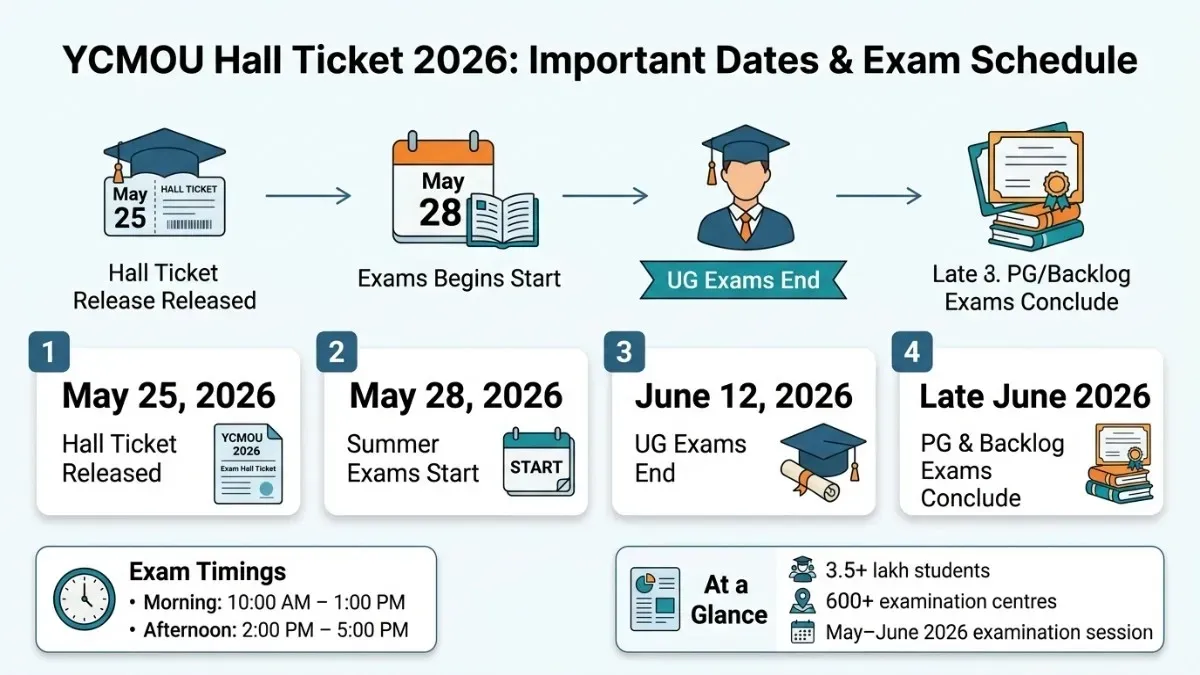
Commencing its Summer 2026 examinations on May 28, 2026, the Yashwantrao Chavan Maharashtra Open University (YCMOU) mandates the YCMOU Admit Card as the essential eligibility document for all candidates. This crucial YCMOU Hall Ticket confirms a student's permission to appear for program-specific papers, including BA, BSc, and MA, with the Summer 2026 hall tickets released on **May 25, 2026**. Students must possess this document to access their examination centres, verifying details for error correction. The Summer 2026 examination cycle concluded by mid-June 2026 for UG programmes, with PG and backlog exams extending through late June 2026.
Table of Contents
YCMOU Hall Ticket 2026: Direct Download Link
Yashwantrao Chavan Maharashtra Open University (YCMOU) releases hall tickets online for students appearing in its UG, PG, diploma and other examinations. Candidates can download the YCMOU hall ticket using their PRN or username through the official examination portal.
YCMOU Hall Ticket Direct Download Link 2026
Candidates can use the links below to directly access the YCMOU hall ticket download or student login page without navigating through the university website.
| Particulars | Direct Link |
| YCMOU Hall Ticket Download | YCMOU Hall Ticket Portal |
| For PRN Starting With '25' | YCMOU Student Login |
| Official YCMOU Website | YCMOU Official Website |
Candidates should select the relevant examination event and enter their login credentials to download the hall ticket. Students whose PRN starts with '25' should use the dedicated student login link provided above.
YCMOU Admit Card Release Dates 2026
YCMOU releases hall tickets separately for different examination sessions and programmes. The hall ticket is generally made available shortly before the examinations begin.
| Particulars | YCMOU Hall Ticket Date 2026 |
| December 2025/January 2026 Winter Examination | December 2025 |
| Agriculture Programmes February/March 2026 | February 2026 |
| Summer Examination May/June 2026 | May 25, 2026 |
| December 2026/January 2027 Examination | December 2026 (Expected) |
Candidates should regularly check the official YCMOU examination portal for updates because hall ticket release dates can vary by programme and examination session.
YCMOU Summer 2026 Exam Schedule
The Summer 2026 examination session was conducted during May and June 2026. The key examination and hall ticket details are given below.
| Particulars | Details |
| Exam Session | Summer 2026 |
| Exam Start Date | May 28, 2026 |
| UG Exam End Date | June 12, 2026 |
| PG/Backlog Exam End Date | Late June 2026 |
| Morning Session | 10:00 AM to 1:00 PM |
| Afternoon Session | 2:00 PM to 5:00 PM |
| Hall Ticket Release Date | May 25, 2026 |
| Students | Over 3.5 lakh |
| Examination Centres | Over 600 across Maharashtra |
The Summer 2026 hall tickets were released on May 25, 2026, shortly before the examinations commenced on May 28, 2026.
YCMOU Exam Timetable 2026
Yashwantrao Chavan Maharashtra Open University (YCMOU) releases a detailed examination timetable for each exam session, specifying the date, time and subject for every paper. Candidates can access the timetable through the official YCMOU website under the Student Zone or Examination Information section.
How to Check YCMOU Exam Timetable 2026
Candidates can check and download the YCMOU exam timetable 2026 by following these steps:
- Visit the official YCMOU website: ycmou.ac.in
- Go to Student Zone and select Examination Information.
- Click on Time Table or Exam Schedule.
- Select the relevant examination event, such as May/June 2026.
- Choose the required programme and course.
- View or download the subject-wise examination timetable.
YCMOU Summer 2026 Exam Timetable Highlights
The Summer 2026 examination timetable covers multiple undergraduate, postgraduate and diploma programmes. The key schedule details are given below:
| Particular | Details |
| Exam Period | May 28, 2026 to June 12, 2026 (UG) |
| PG/Backlog Exams | Extended through late June 2026 |
| Morning Session | 10:00 AM to 1:00 PM |
| Afternoon Session | 2:00 PM to 5:00 PM |
| Programmes Covered | BA, BCom, BSc, BBA, MA, MCom, MSc, MBA, Diploma |
| Practical Exams | B.Lib, M.Lib (Computer Based Practical) |
| Project Submission | Separate schedule for B.Lib, M.Lib projects |
Note: The detailed subject-wise timetable is available on the YCMOU examination portal. Candidates should check the schedule for their specific programme and course to avoid confusion.
YCMOU Admit Card Login 2026: Credentials Required
Students need their Permanent Registration Number (PRN) or username to access and download the YCMOU hall ticket. The basic details related to the admit card are provided below.
| Particulars | Details |
| University | Yashwantrao Chavan Maharashtra Open University |
| Admit Card Name | YCMOU Hall Ticket / Admit Card |
| Examination Mode | As applicable to the programme |
| Hall Ticket Mode | Online |
| Hall Ticket Available On | Official YCMOU Examination Portal |
| Credentials Required | PRN or Username |
| Hall Ticket Download | YCMOU Digital University Portal |
| Special Login for PRN Starting With '25' | YCMOU Student Login |
| Official Website | ycmou.ac.in |
How to Download YCMOU Hall Ticket 2026
Candidates can download their YCMOU hall ticket online by following the steps below:
- Visit the official YCMOU examination portal.
- Open the Hall Ticket or admit card section.
- Select the relevant examination event, such as the May/June 2026 examination.
- Enter your PRN or username as required.
- Submit the login details.
- View the YCMOU hall ticket displayed on the screen.
- Download the hall ticket PDF.
- Take a clear printout for use during the examination.
How to Download YCMOU Hall Ticket Using the Direct Link
Candidates can also use the direct hall ticket portal to save time. Open the YCMOU hall ticket download page, select the applicable examination event, enter the required credentials and download the admit card.
Students with a PRN beginning with '25' should use the dedicated YCMOU student login portal instead.
Details Mentioned on YCMOU Hall Ticket 2026
After downloading the hall ticket, candidates should carefully check all the information printed on it. The admit card generally contains important examination and candidate details, including:
- Candidate's name
- PRN/registration number
- Roll number
- Course and programme
- Subject and paper details
- Subject codes
- Examination date
- Examination time
- Examination centre and address
- Seat or examination details
- Candidate photograph and other identification details
Any discrepancy should be reported to the concerned YCMOU study centre or examination authorities as soon as possible.
Documents Required at YCMOU Exam Centre
Candidates should carry the required documents to the examination centre. These generally include:
- Printed copy of the YCMOU hall ticket/admit card
- Valid government-issued photo ID
A valid photo ID may include an Aadhaar Card, PAN Card, Passport, Driving Licence or Voter ID, subject to the university's examination instructions.
Candidates should follow the instructions printed on the hall ticket and any additional examination-day guidelines issued by YCMOU.
YCMOU Exam Centre Rules & Guidelines
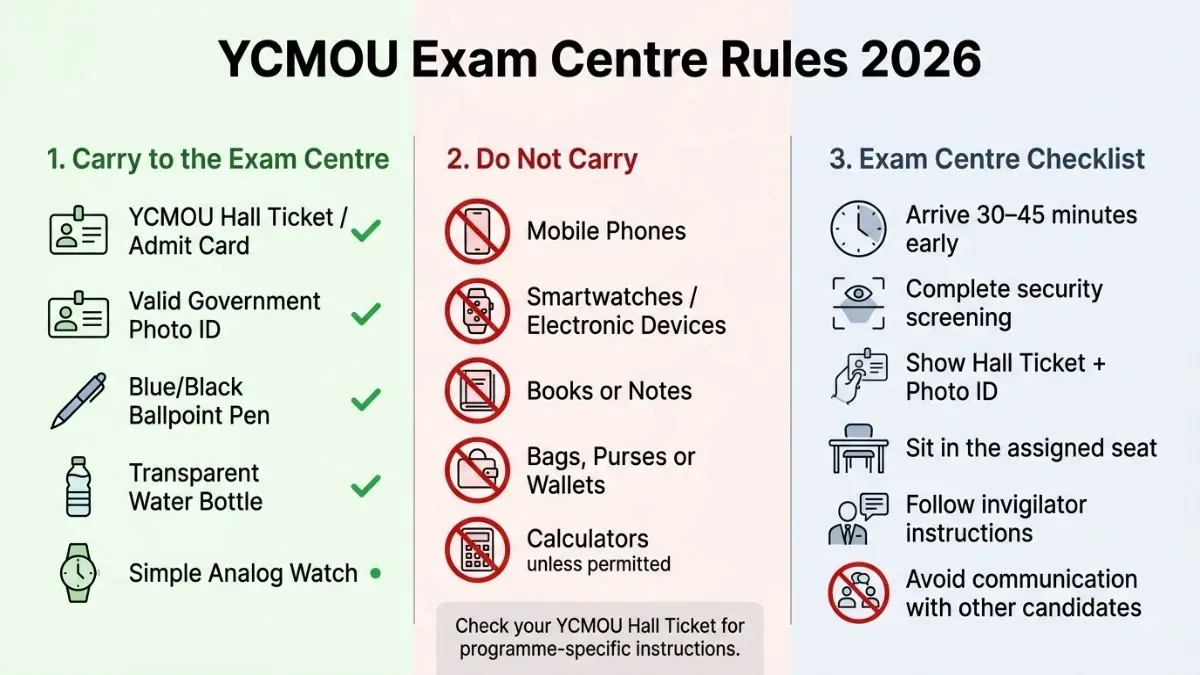
YCMOU has established examination rules and guidelines that candidates must follow at the exam centre. These instructions help ensure a fair and smooth examination process across all 600+ examination centres.
What to Carry to the YCMOU Exam Centre
Candidates should carry the mandatory documents and permitted items required for the examination.
Mandatory Documents:
- Printed copy of the YCMOU Hall Ticket/Admit Card
- Valid government-issued photo ID, such as Aadhaar Card, PAN Card, Passport, Driving Licence or Voter ID
Recommended Items:
- 2–3 extra printouts of the hall ticket as backup
- Blue/Black ballpoint pen
- Transparent water bottle without labels
- Simple analog watch; smartwatches are not permitted
What Not to Carry to the YCMOU Exam Centre
Candidates should avoid carrying prohibited items to the examination hall.
- Mobile phones, smartwatches or other electronic devices
- Calculators, unless specifically permitted for certain courses
- Bags, purses or wallets inside the examination hall
- Books, notes or other written material
- Jewellery or metallic accessories, which may require removal during verification
YCMOU Exam Centre Entry Guidelines
Candidates should reach the examination centre well before the scheduled examination time and complete the required verification procedures.
- Arrival Time: Reach the examination centre at least 30–45 minutes before the exam starts.
- Security Check: Candidates must pass through the security screening process.
- Document Verification: The hall ticket and photo ID will be verified at the entrance.
- Seating Arrangement: Candidates will be directed to their assigned seats based on the seat number mentioned on the hall ticket.
- Late Entry: Candidates arriving after the examination starts may not be permitted to enter.
Guidelines to Follow During the YCMOU Examination
Candidates must follow the instructions given by the invigilator throughout the examination.
- Follow all instructions provided by the invigilator.
- Write the PRN, roll number and other required details clearly on the answer sheet.
- Do not communicate with other candidates during the examination.
- Raise your hand if you require assistance.
- Do not leave the examination hall during the first 30 minutes or the last 15 minutes of the exam.
- Submit the answer sheet before leaving the examination hall.
YCMOU Regional Centres
YCMOU operates through 8 regional centres across Maharashtra:
- Amravati
- Aurangabad
- Mumbai
- Nagpur
- Nashik (Headquarters)
- Pune
- Kolhapur
- Nanded
More than 600 examination centres are distributed across these regions to accommodate over 3.5 lakh students.
What to Do If YCMOU Hall Ticket Cannot Be Downloaded?
If the hall ticket does not appear or the candidate is unable to download it, they should check the following:
- Verify that the PRN or username has been entered correctly.
- Make sure the correct examination event has been selected.
- Try accessing the portal again after some time.
- Candidates with PRN starting with '25' should use the dedicated YCMOU student login portal.
- Check whether the hall ticket has been released for the candidate's programme.
- Contact the concerned YCMOU study centre or examination authority if the issue continues.
Candidates should resolve any hall ticket-related issue before the examination date rather than waiting until the last day.
YCMOU Hall Ticket 2026: Important Instructions
Candidates should keep the following points in mind after downloading the admit card:
- Download the hall ticket as soon as it is released.
- Check the name, PRN, roll number and photograph carefully.
- Verify the examination date, time and subject details.
- Check the complete examination centre address.
- Take a clear printout of the hall ticket.
- Carry the required photo ID to the examination centre.
- Follow all instructions mentioned on the hall ticket.
- Contact YCMOU or the study centre immediately if any information is incorrect.
YCMOU Exam Form 2026 & Repeater Information
Candidates appearing for YCMOU examinations must complete the applicable exam form submission process before the hall ticket is released. Regular, ATKT, backlog and repeater students may have different exam form requirements.
YCMOU Exam Form Submission 2026
- Regular Students: Exam forms are typically filled during admission or at the beginning of the semester.
- ATKT/Backlog/Repeater Students: These candidates must fill the exam form separately through the online portal.
- Exam Form Deadline: The form is usually submitted 15–30 days before the examination session begins.
How to Fill YCMOU Exam Form for Repeaters/Backlog Students
Repeaters and backlog students can follow these steps to submit their examination form:
- Visit the official YCMOU website: ycmou.ac.in
- Go to Student Zone → Examination Information.
- Click on Online Exam Form for Repeaters.
- Enter your PRN and other required details.
- Select the subjects or papers you want to appear for.
- Pay the applicable examination fee online.
- Submit the form and save the confirmation receipt.
Important Points for YCMOU Repeater/Backlog Students
Students appearing for ATKT, backlog or repeater examinations should keep the following points in mind:
- Hall tickets for repeater students are released along with regular students.
- Ensure that all pending fees are paid before submitting the exam form.
- Check whether you need to appear for practical examinations in addition to theory papers.
- Verify subject codes carefully while filling out the examination form.
- Keep the exam form confirmation receipt for future reference.
YCMOU Exam Fee Structure 2026
The approximate examination fee structure for different student categories is given below:
| Category | Exam Fee (Approx.) |
| Regular Students | Included in semester fees |
| ATKT/Backlog (UG) | ₹150–₹300 per paper |
| ATKT/Backlog (PG) | ₹200–₹400 per paper |
| Re-examination | ₹150–₹250 per paper |
Note: The fee structure may vary by programme and is subject to university notifications.
What to Do After Submitting the YCMOU Exam Form?
After submitting the examination form, candidates should complete the following steps:
- Download and save the exam form confirmation.
- Wait for the hall ticket to be released, usually 10–15 days before the examinations.
- Download the YCMOU hall ticket using the PRN or username.
- Verify that all details on the hall ticket match the information submitted in the exam form.
- Report any discrepancy immediately to the concerned study centre.
What should I do if I cannot download my YCMOU Hall Ticket?
First, verify your PRN or username and ensure that you have selected the correct examination event. If your PRN starts with '25', use the dedicated YCMOU student login portal. If the issue persists, contact your study centre or YCMOU examination authorities.
Frequently Asked Questions
What is the YCMOU Hall Ticket?
The YCMOU hall ticket is the official examination admit card issued to eligible students appearing for university examinations. It contains details such as the candidate's name, PRN, examination schedule, subjects and examination centre.
How can I download the YCMOU Admit Card 2026?
Candidates can download the YCMOU admit card through the official examination portal using their PRN or username. They need to select the applicable examination event and download the hall ticket PDF.
When was the YCMOU Summer 2026 Hall Ticket released?
The YCMOU Summer 2026 hall ticket was released on May 25, 2026. The Summer examinations began on May 28, 2026.
When are YCMOU hall tickets generally released?
YCMOU hall tickets are generally made available shortly before the respective examinations. The exact release date varies according to the examination session and programme.
What should I check after downloading the YCMOU Hall Ticket?
Candidates should verify their name, PRN, roll number, photograph, course, subjects, examination date, timing and examination centre address. Any discrepancy should be reported to the concerned authorities promptly.
What documents should I carry to the YCMOU examination centre?
Candidates should carry a printed copy of the YCMOU hall ticket and a valid government-issued photo ID, subject to the instructions mentioned on the admit card.
When did the YCMOU Summer 2026 examinations take place?
The Summer 2026 examinations started on May 28, 2026. UG examinations continued until June 12, 2026, while PG and backlog examinations continued through late June 2026.

fits you best?
Get personalized guidance from our admission counselors