

CSJMU Admit Card 2026: Download Hall Ticket & Exam Updates


With annual examinations for the 2025-2026 session commencing on 11 May 2026, the Chhatrapati Shahu Ji Maharaj University (CSJMU) administration centrally releases the CSJMU Admit Card, an indispensable document confirming a candidate's eligibility to appear for their respective exams. The date sheet for these annual exams was published on 05 May 2026. This crucial admit card is issued for various categories, including annual, semester, back paper, and ex-student examinations, alongside specific announcements for the PhD Entrance Examination 2025-26 Admit Card. A notice dated 14 July 2026 also provided details for the 2025-26 Main Annual Practical Viva Exam.
Table of Contents
How to Download CSJMU Admit Card 2026: Step-by-Step Guide
To download your CSJMU Admit Card 2026 for the annual final year exam, follow a straightforward process on the official university website. This guide provides a clear, step-by-step walkthrough, ensuring you can easily access and secure your essential examination document for the upcoming assessments.
Steps to Download CSJMU Admit Card
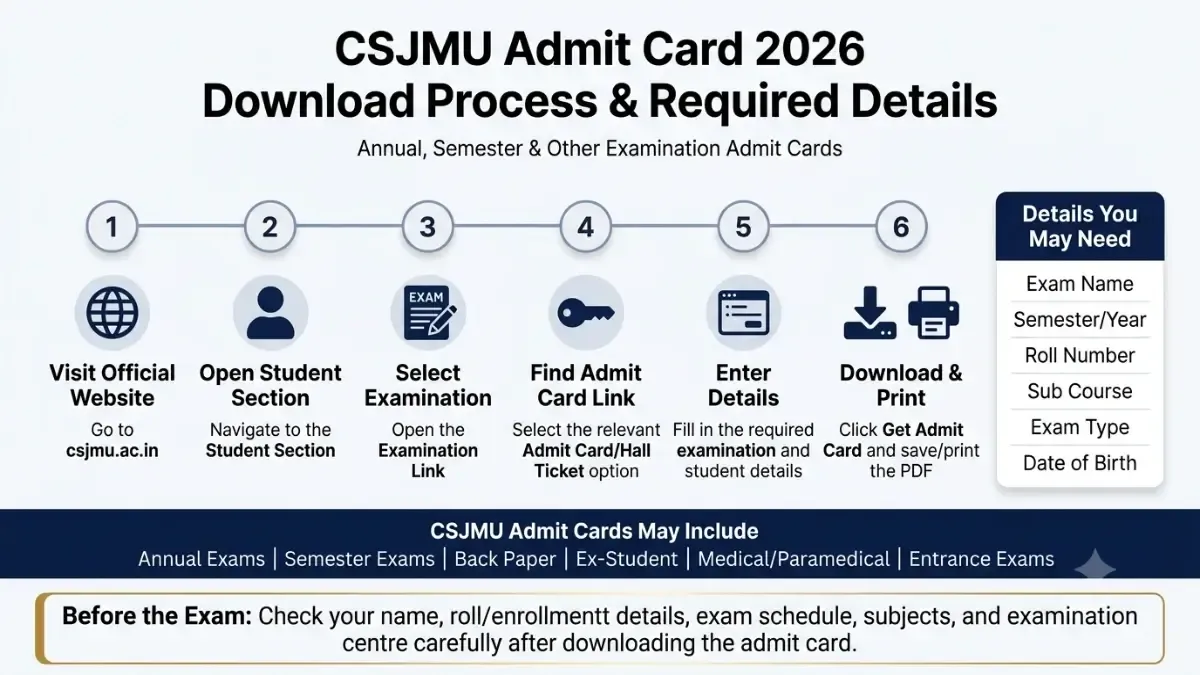
- Step 1: Open the official website, csjmu.ac.in.
- Step 2: Navigate to the 'Student Section'.
- Step 3: Under the 'Student Section', open the 'Examination Link'.
- Step 4: Click the admit card download link for the annual final year CSJMU 2026 exam.
- Step 5: Fill in the required details once the download link opens.
- Step 6: Click the 'Get Admit Card' button after entering all details.
Upon successful submission, the system will download your examination document for the annual final year exams (BA, BSc, BCom, MA, MSc, and MCom). To complete this process, you must provide specific information.
| Required Details |
| Exam Name |
| Semester Year |
| Roll Number |
| Sub Course |
| Exam Type |
| Date of Birth |
Providing these accurate details ensures you successfully retrieve your personalized examination document without issues.
CSJMU Annual & Semester Admit Cards 2026: Latest Updates
This section provides essential details about the CSJMU annual and semester admit cards for the 2026-2027 session. You can find information on availability, covered courses, and the specific steps required to download your admit card from the official university website.
- Admit Card Availability: The final year annual exam admit card is available on csjmu.ac.in.
- Courses Covered: This includes BA, BSc, BCom, MA, MSc, and MCom (final year).
- Exam Session: The relevant exam session is 2026-2027.
- Date Sheet Release: The annual exam date sheet was released on 5 May 2026.
- Exam Start Date: Annual exams for these courses began on 11 May 2026.
- Other Card Types: The university also issues NEP Back Paper, Medical/Paramedical, and Odd Semester Back Paper cards.
These details confirm the key information regarding the annual exams and the various types of admit cards CSJMU provides for its students.
| Step | Action |
| 1 | Visit the official website, csjmu.ac.in. |
| 2 | Navigate to the Student Section. |
| 3 | Click on the Examination Link. |
| 4 | Find the admit card download link. |
| 5 | Fill in required details: Exam Name, Semester Year, Roll Number, Sub Course, Exam Type, and Date of Birth. |
| 6 | Click 'Get Admit Card' to complete the process. |
Follow these clear steps to successfully download your admit card directly from the university's official portal.
Back Paper Admit Card Download Process via Samarth Portal
CSJMU students appearing for back paper examinations can download their admit cards through the Samarth admission portal. The university has shifted the back paper admit card download process to the Samarth Portal, where students need to log in using their Enrollment Number and Password.
Steps to Download CSJMU Back Paper Admit Card
- Visit the CSJMU Samarth Portal: Go to the official CSJMU Samarth Portal.
- Log in to your account: Enter your Enrollment Number and the password created during Samarth Portal registration.
- Open the Admit Card section: Select the “Hall Admit Card” or “Admit Card” option available in the student dashboard.
- Select the examination type: Choose the relevant option, such as Back Paper, Semester Examination, or Odd Semester Back Paper.
- Select your course and examination details: Choose the applicable course and semester/year, if prompted.
- Download the admit card: Click Download or Print and save the admit card as a PDF for future reference.
Details Required to Download the Back Paper Admit Card
Students should keep the following details ready before accessing their admit card:
| Required Detail | What to Enter/Select |
| Enrollment Number | University Enrollment Number |
| Password | Password registered on the Samarth Portal |
| Examination Type | Back Paper/Semester/Odd Semester Back Paper |
| Course | BA, BSc, BCom, MA, MSc, MCom, etc. |
| Semester/Year | Applicable semester or academic year |
Note: Students should use their Enrollment Number rather than their Roll Number to log in to the Samarth Portal. If the admit card is not visible after login, students should verify that they have selected the correct examination type and semester.
ODL July 2026 Exam Admit Card
According to official CSJMU website, the "ODL JULY 2026 EXAM" admit card is available for Back Paper / Ex-Student candidates under the Open Distance Learning (ODL) programme.
Download Link: Available on the official CSJMU website under "Examinations" > "NEP Back Paper Admit Card" section.
CSJMU Admissions 2026-27: Current Status
According to the official CSJMU admission portal (https://csjmuadm.samarth.edu.in), as of August 20, 2026:
- Admissions Status: CLOSED
- Registration Deadline: August 20, 2026
- Application Window: Ended
Students who have already applied can proceed with downloading admit cards and appearing for examinations. New applications are no longer being accepted for the 2026-27 admission cycle.
CSJMU PhD Entrance Exam 2025-26: Timeline & Admit Card Details
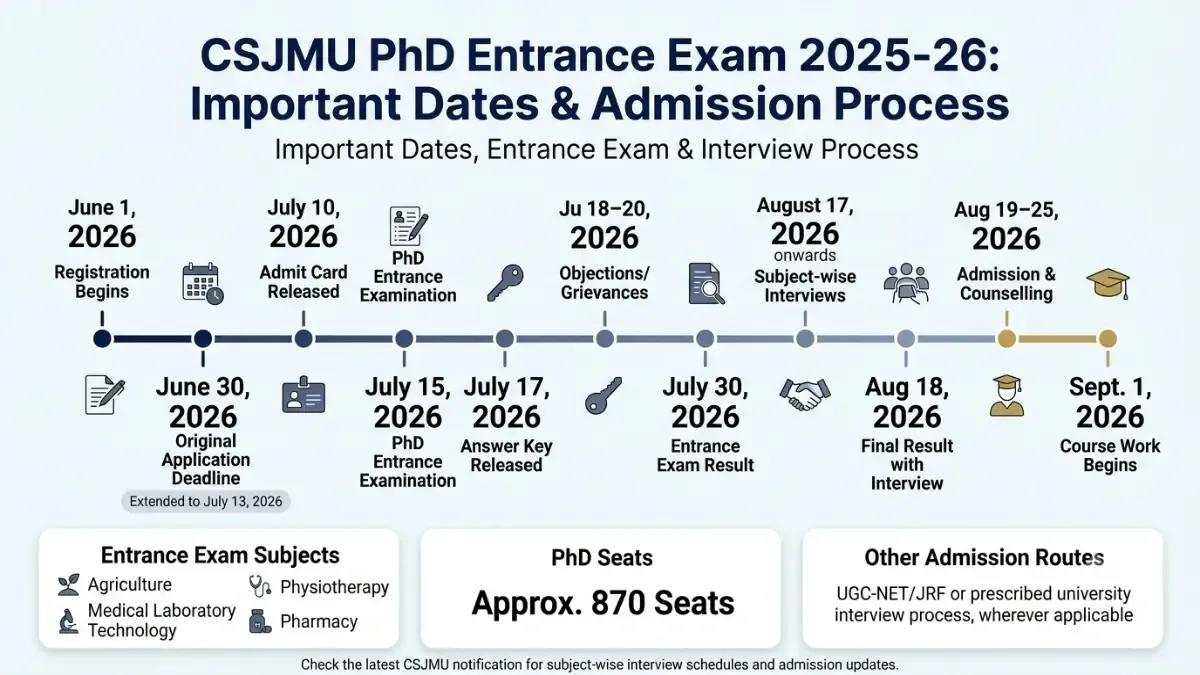
CSJMU conducted the PhD Entrance Examination 2025-26 for selected disciplines as part of the university's doctoral admission process. The admission process includes registration, admit card issuance, entrance examination, answer key, result declaration, subject-wise interviews, and final admission.
| Event | Date | Status |
| PhD Registration Start | June 1, 2026 | Completed |
| Last Date to Apply | June 30, 2026; extended to July 13, 2026 | Completed |
| Admit Card Release | July 10, 2026 | Released |
| Entrance Exam | July 15, 2026 | Completed |
| Answer Key Release | July 17, 2026 | Released |
| Objection/Grievance Period | July 18–20, 2026 | Completed |
| Entrance Exam Result | July 30, 2026 | Released |
| Subject-wise Interviews | August 1–12, 2026 | In Progress |
| Final Result with Interview | August 18, 2026 | Scheduled |
| Admission & Counselling | August 19–25, 2026 | Scheduled |
| PhD Course Work Begins | September 1, 2026 | Scheduled |
Subjects Covered Under the CSJMU PhD Entrance Exam
For the 2025-26 admission cycle, the PhD entrance examination was conducted for selected disciplines, including:
- Agriculture
- Medical Laboratory Technology
- Physiotherapy
- Pharmacy
For other disciplines, candidates may be considered through UGC-NET/JRF qualification or the university's prescribed interview-based admission process, as applicable to the subject and admission notification.
CSJMU PhD Seats and Interview Process
CSJMU has notified approximately 870 PhD seats across different disciplines for the 2025-26 admission cycle. Candidates who qualify through the applicable admission route proceed to the subject-wise interview stage as per the university's schedule.
Subject-specific interviews are conducted separately for different disciplines. For example, the Psychology interview is scheduled from August 17, 2026, at the Research & Development Cell. Candidates should check the subject-wise interview schedule and report at the designated venue and time.
Note: PhD admission dates and interview schedules may be revised through university notifications. Candidates should verify their subject-specific schedule before appearing for the interview or completing admission formalities.
CSJMU Admit Card 2026 Details: What Information to Verify
CSJMU provides admit cards as a student service for various examinations. To ensure a smooth experience for your upcoming 2025-26 exams, you must verify key details on your CSJMU admit card. This section outlines the types of cards issued and crucial information you need to check.
- Availability: CSJMU provides admit cards as a student service.
- Issued For: Cards cover NEP Back Paper, Campus Backpaper, Entrance, Annual, Medical/Paramedical, and Odd Semester Back Paper exams.
- Notice Date: A notice regarding 2025-26 exams was dated 14 July 2026.
- Relevant Exams: This notice pertained to 2025-26 Main Annual Practical Viva Exam and Left Over Practical Exam.
- Verify Schedule: You must verify the Exam Schedule on your card.
- Verify Center: You must also verify the Exam Center on your card.
2025-26 Main Annual Practical Viva Exam Notice (July 14, 2026)
According to official CSJMU announcements, a notice dated July 14, 2026 was released regarding the 2025-26 Main Annual Practical Viva Exam and Left Over Practical Exam.
Key Details:
- Notice Date: July 14, 2026
- Exam Type: Main Annual Practical Viva Exam and Left Over Practical Exam
- Session: 2025-26
- Admit Card: Available on the official CSJMU website under "Examinations" section
- Phone: 0512-2246609, 0512-2246608
- Email (General): info@csjmu.ac.in
- Email (SSC): ssc@csjmu.ac.in
- Email (Registrar): registrar@csjmu.ac.in
- Email (PhD): phdinfo@csjmu.ac.in (for PhD-related queries)
Frequently Asked Questions
How can I download my CSJMU admit card online?
Download your CSJMU admit card by selecting 'Examination' then 'Hall Ticket'. Choose 'View', then 'Print' to save it as a PDF from the university portal.
What details are required to download the CSJMU admit card?
To download the CSJMU admit card, students typically need their Roll Number or Registration Number along with their Date of Birth or password.
What should I do if I cannot download my CSJMU admit card?
If you cannot download your CSJMU admit card, contact the university at:
Do all registered students automatically receive a CSJMU admit card?
No, registered students typically need to download their CSJMU admit card from the university portal. It is not automatically sent to them.

fits you best?
Get personalized guidance from our admission counselors