Latest Updates
- 03 Jun, 2026: CUET UG 2026: Admit Cards Released for Rescheduled Exam
Admit cards for the CUET UG 2026 rescheduled exam are now available. The exam, initially on May 30, was postponed due to a technical issue affecting around 3,765 candidates. Download your admit card from cuet.nta.nic.in for exams scheduled between June 6 and June 7, 2026.
- 02 Jun, 2026: CUET UG 2026 Admit Cards Released for Rescheduled Exams
NTA has released CUET UG 2026 admit cards for candidates whose exams were rescheduled from May 30, 2026, due to technical issues. Affected examinations will now be held on June 6 and June 7, 2026. Candidates can download their revised admit cards from cuet.nta.nic.in using their application number and password.
- 01 Jun, 2026: CUET UG Admit Card 2026 for New Exam Date Out Soon
The CUET UG Admit Card 2026 for the revised examination date is expected to be released soon. Candidates are advised to regularly check the official portal for the latest updates regarding the admit card download process. Complete details will be made available shortly.
- 01 Jun, 2026: CUET UG 2026: Revised Exam Dates for May 28 & Admit Card Out
CUET UG 2026 new exam dates have been officially released. Candidates can now check the revised schedule, specifically noting updates for May 28. Further details regarding the admit card are also available for students.
- 29 May, 2026: CUET UG 2026 Admit Cards Released: Download Revised Hall Tickets Now
The National Testing Agency (NTA) has released revised CUET UG 2026 admit cards after rescheduling exam dates. Examinations are now scheduled for May 31, June 6, and June 7. Candidates should download their new hall tickets from cuet.nta.nic.in and carefully verify all details.
- 28 May, 2026: CUET UG 2026 Admit Card Released (Revised)
The National Testing Agency has released the admit cards for the revised exam schedule of May 31 , with a direct link active, and cards for June 6-7 will follow soon.
- 27 May, 2026: CUET UG 2026 Rescheduled Exam Admit Card OUT; New Date Announced
The admit cards for the CUET UG 2026 rescheduled exam have been released. Candidates can download their admit cards from cuet.nta.nic.in. A new exam date has also been announced for the rescheduled examination.
The CUET Admit Card (also called the Hall Ticket) is the most important document you need on exam day. Without it, candidates will not be allowed entry into the examination centre under any circumstances. The National Testing Agency releases the CUET UG admit card on its official website a few days before the examination begins. Students must download the admit card using their application number and password or date of birth. It is essential to check all the details mentioned on the admit card carefully, including your name, exam centre, date, and subject details. This article covers everything about the admit card — how to download it, what details to verify, what documents to carry, and what to do if you face any errors.
Table of Contents
CUET Admit Card 2025: Quick Summary
The CUET UG admit card is released by the National Testing Agency (NTA) a few days before the exam begins. The table below provides a quick overview of the CUET admit card release date, exam mode, and important details candidates should know. This summary helps students understand the timeline and key requirements related to the CUET admit card 2026.
| Detail | Information |
| Issuing Authority | National Testing Agency (NTA) |
| Official Website | cuet.nta.nic.in |
| Admit Card Release Date (2025) | May 10, 2025 (Phase 1); May 15, 2025 (Phase 2) |
| Exam Duration (2025) | May 13 – June 3, 2025 |
| Exam Mode | Computer Based Test (CBT) |
| Exam Centres in India | 300+ cities |
| Exam Centres Outside India | 15 international centres |
| Login Credentials to Download | Application Number + Date of Birth |
| Accepted Format at Exam | Printed hard copy only (digital/mobile not accepted) |
Candidates should regularly check the official website for updates related to the NTA CUET UG admit card. The CUET admit card release date is usually announced a few days before the examination. Since the admit card is released phase-wise, students appearing in later phases may receive their hall tickets slightly later than others. Always download the admit card as soon as it becomes available to avoid last-minute technical issues.
CUET City Intimation Slip 2026 (Before Admit Card Release)
Before the CUET admit card 2026 is released, the National Testing Agency (NTA) issues the City Intimation Slip (also called the Exam City Intimation Slip). This document is not the admit card — it is only a preliminary notification informing candidates about the city where their exam will be conducted.
| Document | What It Contains | When Released |
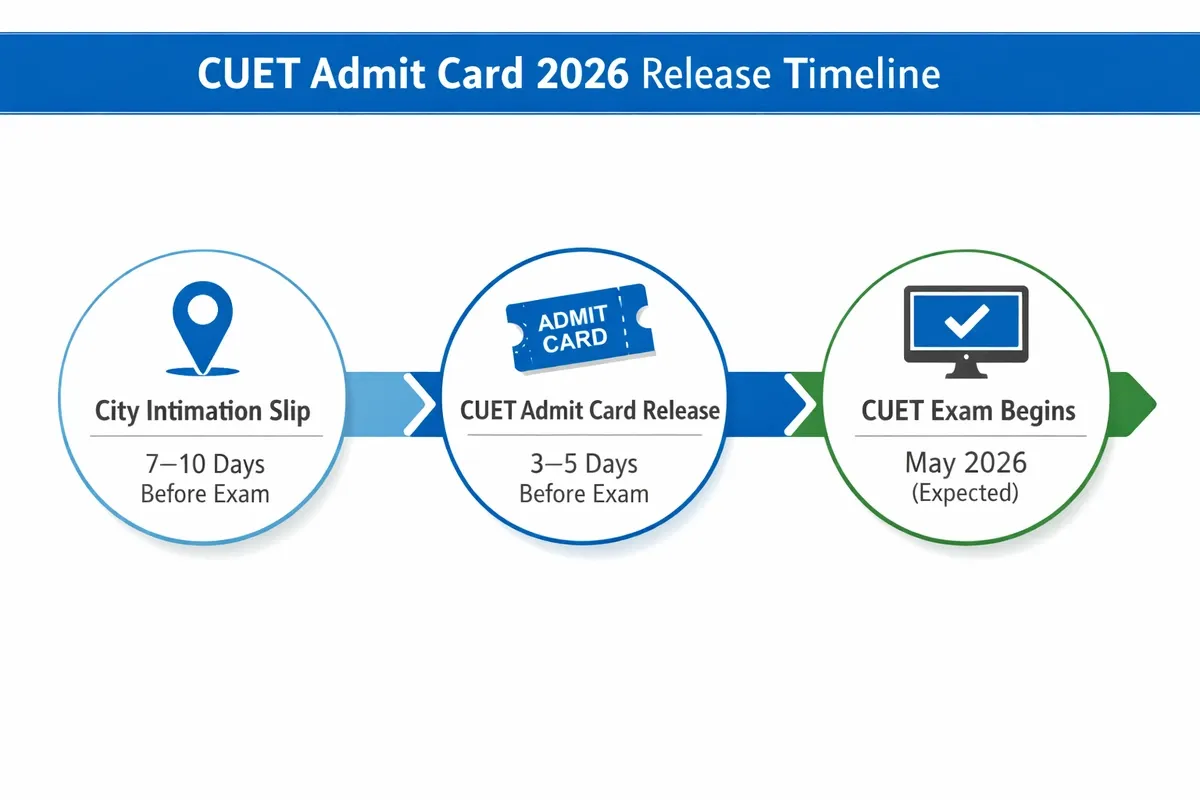
| City Intimation Letter | Exam city, exam phase/date range, application number confirmation | 7–10 days before admit card |
| Admit Card (Hall Ticket) | Exact exam centre address, date, time, roll number, photo, full instructions | 3–5 days before the exam |
The City Intimation Letter helps you plan travel and accommodation in advance. Many students book accommodation after receiving the letter since the exact address comes only on the admit card. Both documents are downloaded from the same portal — cuet.nta.nic.in.
CUET Admit Card 2026 Download Direct Link
The CUET admit card download direct link becomes active once the NTA CUET UG admit card is officially released. Candidates can download the CUET admit card 2026 only from the official website.
| Link Type | Details |
| Official Website | cuet.nta.nic.in |
| Login Portal | examinationservices.nic.in |
| Admit Card Status | To be activated soon |
| Login Credentials Required | Application Number + Date of Birth |
Once released, candidates should download the NTA CUET UG admit card immediately and print at least two copies for exam day use.
Important Tip
Do not wait until the last day to download your CUET UG admit card, as heavy website traffic may slow down the server.
How to Download the CUET UG Admit Card: Step-by-Step
Follow the steps below to download your CUET admit card 2026 from the official portal:
- Open a browser and go to cuet.nta.nic.in
- On the homepage, look for the link "Download Admit Card for CUET(UG) – 2025" or similar
- Click the link — you will be redirected to the exam services login page (examinationservices.nic.in)
- Enter your Application Number (from your registration email or login dashboard)
- Enter your Date of Birth in DD/MM/YYYY format
- Enter the Security Code / CAPTCHA shown on screen
- Click Submit
- Your admit card will appear on screen as a PDF
- Download and print at least two copies. Keep one as backup.
Tips for Downloading
- Use a desktop or laptop browser for the best experience. Mobile browsers sometimes fail to render the PDF correctly.
- Use Chrome or Firefox. Avoid Internet Explorer or older browsers.
- If the PDF does not load, clear browser cache and try again.
- Do not wait until the last day. Servers become slow as millions of students try to download simultaneously.
- Save the PDF to at least two locations (email yourself a copy as backup).
Forgot Application Number? How to Recover It
If you forget your application number, follow these steps:
1 Visit the official CUET login portal
2 Click on Forgot Application Number
3 Enter your registered email ID or mobile number
4 Retrieve your application number
5 Use it to download the CUET admit card 2026
Details Printed on the CUET Admit Card
After downloading the NTA CUET UG admit card, candidates must carefully verify all the details printed on the admit card. Even a small error in personal information or exam details may create problems on exam day. The table below explains each field printed on the CUET UG admit card and what candidates should check carefully.
| Field | What It Shows | What to Verify |
| Candidate Name | Full name as registered | Must match Class 12 mark sheet and ID proof exactly |
| Application Number | Unique registration number | Note this — needed for all future NTA communications |
| Roll Number | Exam-specific number assigned by NTA | This is different from application number; used for result lookup |
| Date of Birth | As entered during registration | Verify against school certificate |
| Photograph | Photo uploaded during registration | Should be clearly visible; take a fresh print if faded |
| Signature | Signature scanned during registration | Should be visible; used for verification at exam centre |
| Exam Date and Day | The specific date you are scheduled to appear | Mark your calendar immediately |
| Reporting Time | When you must arrive at the exam centre | Usually 30–45 minutes before exam start time |
| Exam Start Time | Actual exam start time | Entry is typically denied after the gate closes (15–30 min before exam) |
| Exam Centre Name | Name of the test centre | Note this carefully |
| Exam Centre Address | Full postal address of the test centre | Look it up on Google Maps immediately after downloading |
| Exam City | City of your assigned centre | Should match your city preference from registration |
| Subjects / Papers | List of subjects you have registered for | Verify all subjects match your registration |
| Category | General / OBC / SC / ST / EWS / PwD | Must match the category under which you registered |
| Important Instructions | Dos and don'ts for exam day | Read completely before exam day |
If you notice any incorrect information on your CUET admit card, contact the NTA helpdesk immediately before the exam date. Ignoring errors such as wrong subjects, incorrect date of birth, or mismatched category details may lead to complications during entry verification at the examination centre.
Documents to Carry on CUET UG Exam Day
Along with the CUET admit card, candidates must carry certain mandatory documents to the examination centre. Without proper identification and required paperwork, entry into the exam hall may be denied. The following table lists all essential documents needed on CUET UG exam day.
| Document | Mandatory? | Notes |
| Printed CUET UG Admit Card | Yes – Mandatory | A4 size printout; black and white is acceptable; digital copy on phone is NOT accepted |
| One Valid Photo ID (Original) | Yes – Mandatory | Aadhar card, PAN card, Voter ID, Passport, Driving Licence, or School ID — any one |
| Additional Passport-size Photograph | Recommended | Some centres ask for an extra photo; carry 2–3 copies |
| PwD Certificate (if applicable) | Yes – for PwD candidates | Required for scribe or extra time request at the centre |
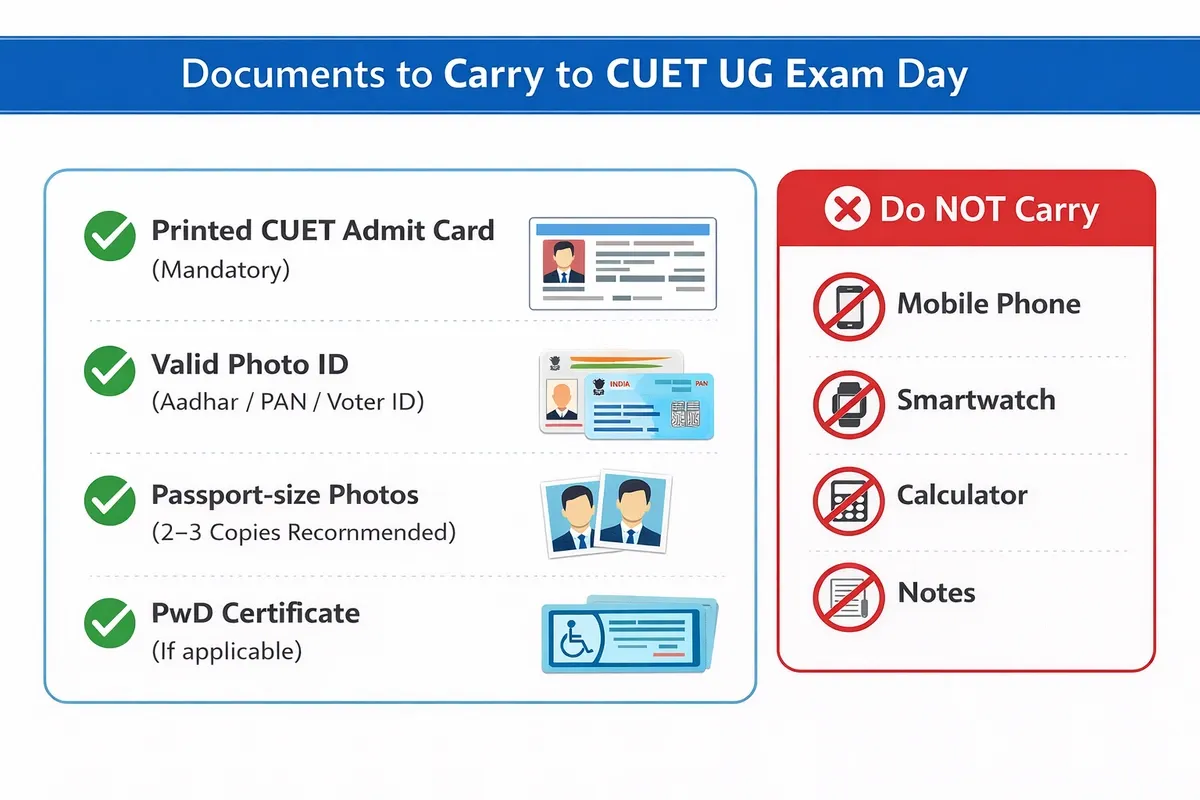
Do not carry: Mobile phone, smartwatch, calculator, wallet, food, water bottle (unless medical need is declared), or any stationery. The exam is CBT — all rough work is done on screen. Most centres have lockers or storage areas outside.
What Not to Carry to the CUET Exam Centre
Candidates must strictly follow the rules regarding prohibited items while appearing for the CUET UG exam. Carrying restricted items may lead to confiscation or even cancellation of the examination. The table below highlights common prohibited items and their possible consequences.
| Prohibited Items | Consequence of Carrying |
| Mobile phone or smartphone | Confiscated; may lead to cancellation of exam |
| Smartwatch or digital watch | Not allowed; only analogue watches permitted |
| Bluetooth devices or earphones | Treated as use of unfair means; exam cancelled |
| Calculator or electronic gadget | Not permitted; CBT has no need for one |
| Study material or notes | Confiscated; treated as suspected malpractice |
| Wallet with thick cash | Leave wallet at home; carry minimal cash only |
To avoid inconvenience on exam day, carry only essential items such as your CUET admit card, valid photo ID, and permitted documents. Leaving unnecessary items at home will help ensure faster security checks and smoother entry into the exam centre.
CUET Exam Dress Code Guidelines
Candidates appearing for the CUET UG exam must follow basic dress code instructions to ensure smooth entry into the examination centre.
Recommended Dress Code for CUET Exam
- Wear light and simple clothing
- Prefer half-sleeve shirts or tops
- Use slippers or low-heel sandals
- Avoid thick-soled shoes
- Keep accessories minimal
Items to Avoid
- Heavy jewellery
- Metal accessories
- Caps or headgear (unless religious reasons)
- Smartwatches or digital accessories
- Sunglasses inside exam hall
Following the proper dress code helps speed up security checks and reduces delays during entry.
Exam Day Instructions from NTA
- Reach the exam centre at least 30–45 minutes before reporting time. Late entry is not permitted after the gate closes.
- Entry gates typically close 15 minutes before exam start time. Do not be late.
- Biometric verification (fingerprint and photograph) is done at the centre. Do not apply lotion or nail polish before the exam.
- A rough sheet is provided on the computer screen for CBT. Do not bring your own paper.
- Do not leave the exam hall before the exam ends unless permitted by the invigilator.
- After the exam, the on-screen response sheet can be viewed and contested through the NTA challenge window.
CUET Admit Card: Common Errors and How to Fix Them
Sometimes candidates may find errors in their CUET admit card, such as incorrect personal details or blurred photographs. It is important to resolve these issues immediately before the exam date. The table below lists the most common problems related to the CUET UG admit card and how to fix them.
| Error | Solution |
| Name spelling mistake | Contact NTA helpdesk at cuet@nta.ac.in immediately with proof (Class 12 mark sheet) |
| Wrong date of birth | Submit correction request through NTA's portal or email with supporting documents |
| Photograph not visible / blurred | Print from the original PDF at higher DPI; if still unclear, contact the exam centre on the day with an extra photograph |
| Wrong exam date or subject | Verify against your registration confirmation; contact NTA at 011-40759000 for correction |
| Admit card not downloading | Clear browser cache; try a different browser; try at a non-peak time (late night or early morning) |
| Cannot log in (application number or DOB not matching) | Check registration confirmation email for exact application number; use DD/MM/YYYY format for DOB |
Most corrections to core data (name, DOB) are not possible after the correction window closes. Ensure your registration details are accurate before the application correction window expires during the registration phase itself.
CUET UG 2026 vs 2025: Admit Card Timeline Comparison
Understanding the expected timeline for the CUET admit card release date helps candidates stay prepared and avoid missing important updates. Based on previous trends, the following comparison table shows how the CUET admit card 2026 timeline is expected to align with the previous year's schedule.
| Event | CUET 2025 | Expected 2026 (Based on Trend) |
| City Intimation Letter | Early May 2025 | Early May 2026 |
| Admit Card Release (Phase 1) | May 10, 2025 | ~May 10, 2026 |
| Admit Card Release (Phase 2) | May 15, 2025 | ~May 15, 2026 |
| Exam Start | May 13, 2025 | ~May 2026 |
| Exam End | June 3, 2025 | ~June 2026 |
NTA typically releases the CUET UG admit card 3–5 days before the first exam date. The exam usually runs across multiple phases over 3 weeks. Students scheduled for later phases receive their admit cards in subsequent batches. For CUET 2026, check cuet.nta.nic.in from April 2026 onwards for notifications.
CUET Admit Card Release Pattern
The CUET admit card release date follows a predictable sequence every year. Understanding this pattern helps candidates track updates and avoid missing important notifications.
Typical CUET Admit Card Release Sequence
| Stage | Expected Timeline |
| City Intimation Slip Release | 7–10 days before exam |
| Admit Card Release | 2–5 days before exam |
| Phase-wise Admit Cards | Released based on subject exam dates |
Candidates appearing in later phases may receive their CUET admit card 2026 slightly later than those scheduled for earlier exam dates.
Key Insight
The City Intimation Slip is released first, followed by the CUET UG admit card shortly before the exam.
Frequently Asked Questions
Based on previous trends, the CUET UG 2026 admit card is expected to be released in May 2026, a few days before the exam begins. The exact release date will be announced by the National Testing Agency on its official CUET website. Candidates should check regularly from April 2026 onwards for updates.
No. Candidates must carry a printed hard copy of the CUET UG admit card to the exam centre. Digital copies on mobile phones or tablets are not accepted. It is recommended to print at least two copies on A4-size paper.
If you forgot your application number, check your registered email inbox where it was sent during registration. If you still cannot find it, contact the National Testing Agency helpdesk through the official CUET website for assistance. Do not delay resolving this issue.
Exam cities are assigned based on availability and capacity. If your allotted city differs from your preference, you must appear at the assigned centre. Changes are generally not allowed after the admit card is issued.
Print the admit card again using high-quality settings. If the photograph is still unclear, carry 2–3 extra passport-size photographs to the exam centre and inform the invigilator at reporting time.
Many candidates report slow downloads on release day due to heavy traffic. It is advisable to download the CUET admit card during non-peak hours such as early morning or late night.